

I was sitting in a crowded coffee shop last Tuesday, mid-flow in a complex design session, when the guy at the next table decided to launch a massive, three-dimensional architectural model right in the middle of the shared air. I couldn’t see my own coffee, let alone my workspace, because his digital skyscraper was practically invading my personal bubble. It was a perfect, cringe-worthy example of why we desperately need to talk about Spatial Computing Etiquette. Most people think “etiquette” means following a dry list of corporate protocols, but in reality, it’s just about not being a digital jerk to the people sharing your physical reality.
Look, I’m not here to give you a lecture on theoretical social frameworks or some overpriced white paper written by a committee. I’ve spent way too many hours in headsets—both the good and the deeply awkward—to know what actually works when the virtual and physical worlds collide. I’m going to give you the straight truth: a no-nonsense guide to navigating shared spaces without making everyone around you want to unplug your headset. This is about real-world survival for the spatial era.
Table of Contents
Mastering Your Digital Presence in Augmented Reality

When you step into a shared AR space, you aren’t just moving your body; you’re projecting a digital version of yourself that others have to live with. It’s easy to forget that your movements translate to everyone else in the room. If you’re constantly flailing your arms or spinning in circles while interacting with menus, you’re going to look erratic and, frankly, a little unhinged to anyone watching. Developing a sense of virtual avatar social conduct is less about following a strict rulebook and more about not being a visual distraction to the people around you.
The trick is to find a balance between being interactive and being intrusive. One of the biggest hurdles is navigating eye contact in virtual environments without making things feel incredibly awkward. We’ve all been there—staring intensely at a digital floating window while someone is trying to talk to us, making us look completely disconnected. Instead, try to acknowledge the physical world periodically. It keeps your digital presence from feeling like a wall between you and reality, ensuring you stay grounded rather than becoming a ghost in the machine.
Respecting Wearable Technology Boundaries in Public Spaces
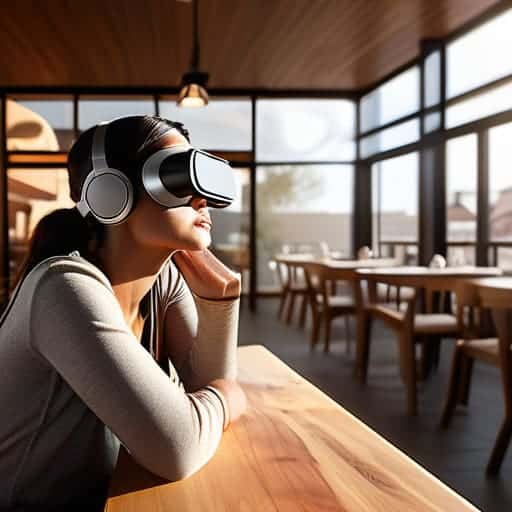
Look, we’ve all been there: you’re sitting in a coffee shop, minding your own business, when someone sits across from you wearing a headset that looks like a high-tech scuba mask. It’s jarring. When you’re out in the wild, you have to remember that while your world might be filled with floating menus and 3D models, the person next to you is still living in the physical one. Respecting wearable technology boundaries means acknowledging that your gear shouldn’t turn a shared public space into your private playground. If you’re staring blankly into space or twitching your hands to interact with invisible objects, you’re going to look a little unhinged to the uninitiated.
Beyond the technical etiquette, there’s also the matter of how you transition from your digital bubble back into the real world, especially when you’re out exploring a new city. It can be a bit of a sensory shock, so I always find it helpful to have a solid plan for when the headset comes off and you’re ready to actually engage with the local scene. If you’re heading to Scotland and looking to navigate the more intimate or social side of the city once you’ve disconnected, checking out some local insights on sex in edinburgh can be a great way to ground yourself in the actual culture of the place.
More importantly, we need to talk about spatial awareness and safety. It’s easy to get so lost in a high-fidelity overlay that you forget you’re walking through a crowded terminal or a busy sidewalk. Don’t be the person who trips over a curb because they were busy rearranging their virtual desktop. Keep one eye on the digital and at least one eye on the actual world around you to ensure you aren’t becoming a walking hazard.
The Unspoken Rules of Not Being a Spatial Nuisance
- Watch your virtual clutter. We’ve all seen that one person whose digital workspace looks like a junk drawer exploded in the middle of a coffee shop. If your floating windows are obstructing the physical view of everyone else in the room, reel it in.
- Mind the “Ghosting” effect. If you’re in a shared AR environment, don’t just stand there like a frozen NPC. If you’re interacting with a digital object, make sure your physical movements don’t look like you’re fighting an invisible swarm of bees—it’s distracting for everyone else.
- Keep the audio private. Using spatial audio is great, but if your “immersive experience” involves blasting high-fidelity soundscapes that leak out of your headset, you’re basically the person playing loud music on a bus. Use headphones or keep the volume low enough that the real world still exists.
- Don’t stare through people. It’s easy to forget that while you’re looking at a 3D data visualization, you’re actually staring directly at a human being’s face. If you need to check a notification, look down or away; don’t just gawk at people while your eyes are busy tracking digital pixels.
- Respect the “Physical First” rule. If someone walks into your personal bubble, the digital world ends immediately. Don’t prioritize your immersive task over a real-world interaction. Acknowledge the human, pause the simulation, and be present.
The Golden Rules of Spatial Etiquette
Keep your digital clutter in check; don’t let your floating windows hijack the shared physical environment.
Be mindful of the “headset stare”—don’t let your gear make you look like you’re ignoring the real world entirely.
Respect the invisible line; just because you can overlay data on someone else doesn’t mean you should.
## The Golden Rule of the Metaverse
“Just because you can overlay a private cinema screen over a crowded coffee shop doesn’t mean you should. Spatial etiquette isn’t about following a manual; it’s about remembering that even if you’re seeing a digital world, everyone else is still stuck in the physical one.”
Writer
The Bottom Line

At the end of the day, spatial computing isn’t just about the hardware you’re wearing or the high-res windows you’re floating in mid-air; it’s about how you navigate the shared reality we’re all building together. We’ve covered everything from keeping your digital clutter from encroaching on someone else’s personal bubble to being mindful of how your headset looks to the person sitting next to you on the train. If you can master the balance between your private digital world and the physical space around you, you’ll avoid being that person who makes everyone else feel awkward. Just remember: mindful presence is the ultimate hack for a seamless mixed reality experience.
We are standing on the edge of a massive shift in how we perceive existence, moving from staring at glass rectangles in our palms to living inside the interface itself. This transition is going to be messy, and we’re definitely going to trip over some new social landmines along the way. But if we approach this new frontier with a bit of empathy and a lot of self-awareness, we can ensure that technology actually enhances our connection to the world rather than isolating us from it. Let’s make sure we build a digital future that feels genuinely human.
Frequently Asked Questions
How do I handle it if someone’s digital avatar is being unintentionally intrusive or creepy in a shared space?
Look, it’s awkward. You don’t want to be the person making a scene, but if someone’s avatar is looming too close or acting weird, a quick, low-key nudge is your best bet. Try something like, “Hey, your avatar’s clipping into my workspace a bit—mind nudging it back?” Most people aren’t trying to be creeps; they just haven’t calibrated their personal bubble settings. Keep it casual, keep it helpful, and move on.
Is there a "silent mode" equivalent for spatial computing so I don’t accidentally blast audio into a room full of people?
The short answer? Yes, but it’s more about your setup than a single “mute” button. Most headsets lean heavily on bone conduction or directional audio, which is a lifesaver. But if you’re using over-ear buds, you’re basically a walking loudspeaker. My rule of thumb: if you aren’t using spatial audio that “anchors” the sound to your virtual workspace, you’re asking for trouble. Keep those levels low and your headphones snug.
What’s the etiquette for recording or taking screenshots when there are other people’s digital overlays in my field of view?
Look, if you’re capturing a moment, don’t be a digital scavenger. If someone else’s custom workspace or private widgets are cluttering your frame, ask before you hit capture. It’s basically the spatial version of accidentally filming someone’s private conversation. If you can’t ask, just crop them out or tilt your view. Nobody wants their personal digital setup broadcasted to your followers without a heads-up. Keep it respectful, or you’re just being a creep.